
Step 6: Access the Strategic Dashboard #
After your registration is reviewed and your tier is upgraded:
- Log in to your account.
- Locate the Affiliate Program menu in the dashboard.
- Click on Affiliate Program. You should verify that your commission rate is displayed as 35%.
Step 7: Referral Link & Coupon Area #
This section allows you to access your unique tracking assets.
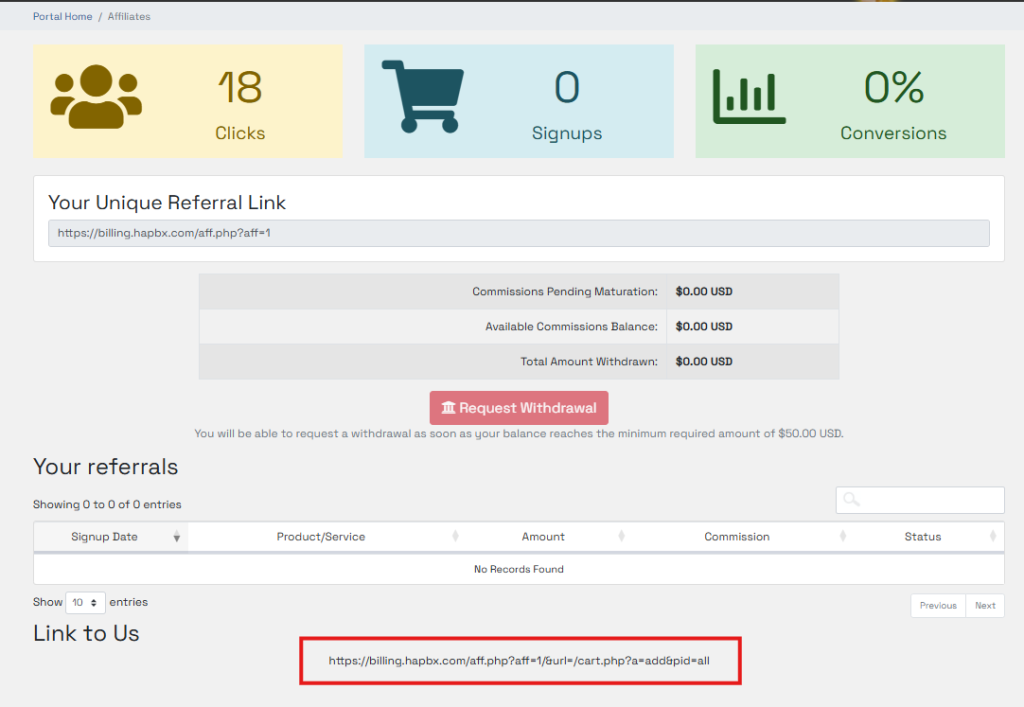
1. Unique Referral Link
- Location: The dashboard displays your unique referral link.
- How to Use: Share this link with your clients. Any registration through this link is tracked for 90 days.
2. Exclusive Client Coupon (Strategic Perk)
- What it is: A 20% Lifetime Discount code for your clients.
- How to get it: Once approved, your unique coupon code (e.g., PARTNER20) will be assigned to your account. Check your dashboard or welcome email for this code.
- Benefit: Using this coupon significantly increases conversion rates for high-value Enterprise deals.
Understanding Your Dashboard Metrics
- Clicks: Traffic volume generated.
- Signups: New users registered via your link.
- Conversions / Sales: Successful paid subscriptions.
- Commissions (Pending / Available): Your revenue share earnings.