
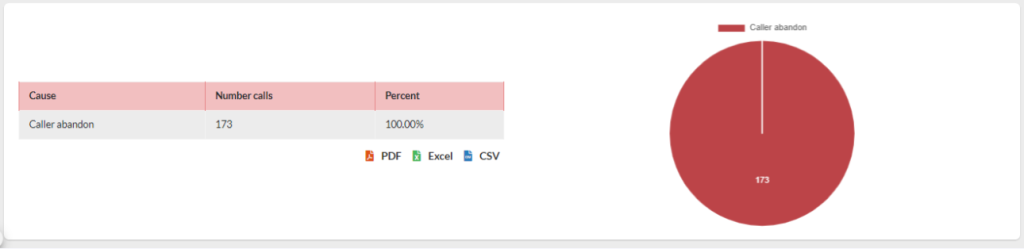
This is a detailed report for the abandoned calls on the Queues and their respective cause. Below, you can see a graph, we got to take into account that the possible causes for abandoned calls are the following:
- Caller Abandoned, means that the caller did not want to continue waiting in Queue, and hung up.
- Exit With Timeout, means that the caller waited the maximum timeout time configured on the Queue, and Queue sent the call to its final destination.
- Exit With Key, means that the caller pressed a key to leave the Queue and take an alternative to their query. This happens when you configure an IVR with a message letting the caller know they can leave the Queue at any time to go elsewhere.
- Exit With Empty, means that when the caller entered Queue there were no agents available and their call was rejected.
Next, we will see a table with the details of the abandoned calls with the following information:
- Date, date and time of the abandoned call.
- Queue, Queue where the call was abandoned.
- Caller, caller’s phone number.
- Position, caller’s position when they abandoned the call.
- Disconnection, cause for abandon from the caller.
- Wait, time the caller was waiting on Queue
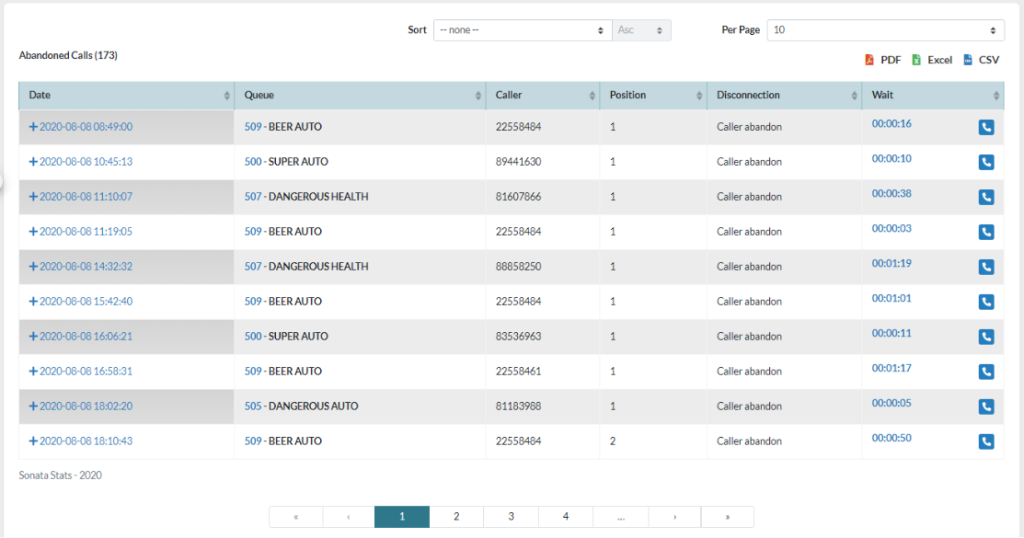
It is possible to see the detail of the events for the abandoned calls by pressing the plus (+) symbol in front of the date.

It is also possible to see if this call was answered later the same day by pressing the phone icon (

) that is to the right of each call.