
The Presence Status module in VitXi allows administrators to define and manage the different availability states that users can display in the application.
Presence statuses help other users and agents identify a person’s current state — such as whether they are available, away, or busy — directly within the VitXi interface.
1. Default Presence Statuses #
By default, VitXi includes five (5) preconfigured presence statuses:
Note: Default statuses cannot be edited or deleted.
You can, however, add new custom statuses to suit your organization’s needs.
2. Creating a Custom Presence Status #
Administrators can create additional presence statuses that reflect specific company workflows or team behaviors.
To create a new status:
- Go to Management → Presence Status.
- Click Create.
- Enter the following information:
| Field | Description |
|---|---|
| Name | The name of the new presence status (e.g., In a Meeting, Remote Work, Training). |
| Select Icon | Choose an icon to represent the status visually. |
| Status Color | Select a custom color to identify the presence state (using the HEX color picker). |
- Click Save to apply changes.
Tip: Use distinct colors for each status to help users easily identify them at a glance in the contact list and presence indicators.
3. User Presence in VitXi WebRTC #
Once configured, presence statuses appear in the user menu within the VitXi WebRTC interface.
To change your presence status:
- Click your user avatar at the top-right corner of the VitXi interface.
- Click the Presence Status dropdown.
- Select the desired status (e.g., Available, Away, Do Not Disturb).
- The new status will be updated instantly for all other users.
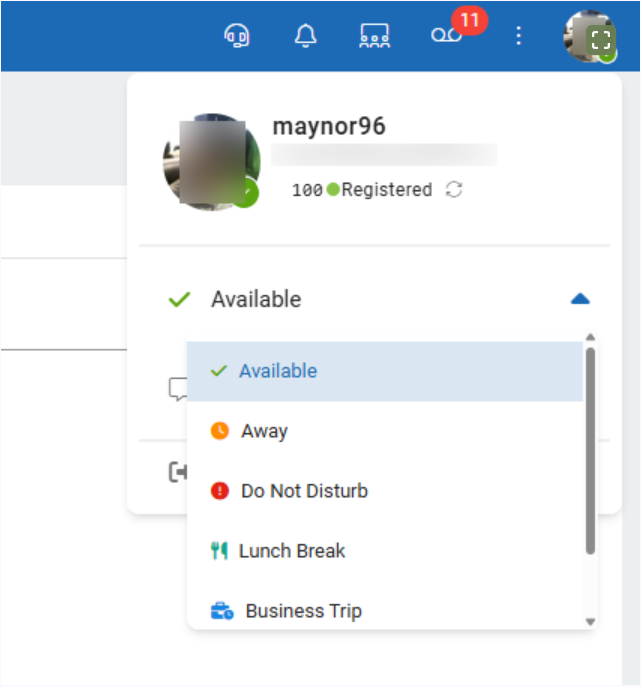
Note: Presence changes are synced in real time across all devices and visible to other users in your tenant.
4. Benefits of Custom Presence Management #
Managing presence statuses helps improve communication and workflow efficiency across your organization.
Some benefits include:
- Reduces unnecessary call attempts to unavailable agents.
- Allows supervisors to quickly identify agent availability.
- Helps coordinate teams working remotely or in multiple time zones.
- Provides greater context for chat and collaboration interactions.